This two-page PDF gives you a known starting point for checking comments, links, highlights, text boxes and ink after saving or exporting a document. Download a copy, keep the original, and inspect the output from your usual application.
Download the reference PDF Download the full pack and local checker (ZIP)
Quick start: compare one saved export
- Download the reference PDF and keep it unchanged.
- Save a separate output using the app and command you want to check.
- Reopen the output in a second viewer and check links, comments and appearance.
- Record the six checks in the PDF workflow log and download your observations.
No Python is needed for these viewer checks. Use the local checker below when you also want to inspect PDF objects.
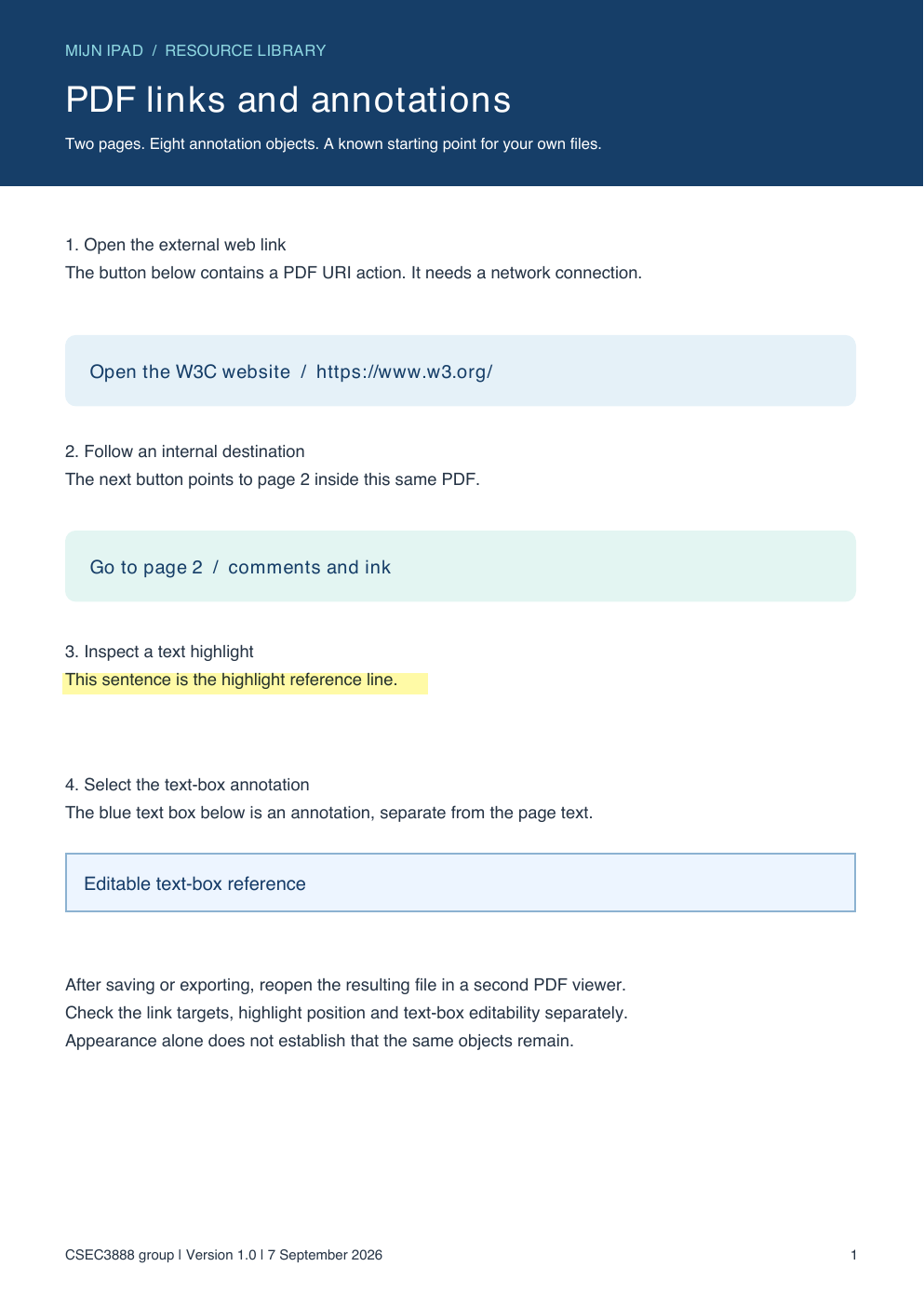
What is in the file?
| Object | Count | Where to look |
|---|---|---|
| Link | 3 | One web link and two internal page links |
| Text note | 2 | A root note and its reply on page 2 |
| Highlight | 1 | The reference sentence on page 1 |
| FreeText | 1 | The blue text box on page 1 |
| Ink | 1 | The blue line on page 2 |
There are eight annotation objects in total and one reply relationship. The external link points to the W3C website. The internal links go to page 2 and back to page 1. The PDF includes no script, embedded attachment or form.
Check an export
- Open the reference and locate every item before editing. Note the application and version.
- Duplicate the file, then save or export with the exact command you normally use. Record that command and the output filename.
- Close the original and reopen the output from its saved folder.
- Inspect the output in a second viewer. Check appearance, link destinations, comment text, the reply relationship and any editing controls you need.
- Keep the output and a short record of the result. Repeat after a relevant app or workflow change.
Apple documents annotation tools in Preview on iPad, and Adobe documents comment import and export in Acrobat. Those instructions describe the tools; inspecting your saved output establishes the result for your file.
Compare with an appearance-only PDF
The appearance-only comparison PDF contains the two rendered pages as images at 120 dpi. It has zero annotation objects and no extractable page text in the local check. The painted buttons and note icons are no longer PDF annotations.
This demonstrates this particular raster copy. Other flattening routes may behave differently. A viewer may also recognise a printed URL automatically, so a successful tap alone does not prove that a PDF Link object survived.
Inspect a file on your own computer
The ZIP contains pdf_inventory.py, a small Python tool that reads selected annotation fields locally. It does not upload documents or open their links. It was checked with Python 3.12.14 and pypdf 6.10.0.
python3 -m venv .venv
.venv/bin/python -m pip install pypdf==6.10.0
.venv/bin/python pdf_inventory.py pdf-reference-v1.pdf
.venv/bin/python pdf_inventory.py your-export.pdf --baseline pdf-reference-v1.pdf
On Windows PowerShell, run these commands in the extracted pack folder:
py -m venv .venv
./.venv/Scripts/python.exe -m pip install pypdf==6.10.0
./.venv/Scripts/python.exe pdf_inventory.py pdf-reference-v1.pdf
./.venv/Scripts/python.exe pdf_inventory.py your-export.pdf --baseline pdf-reference-v1.pdf
If the Python launcher py is unavailable but python runs Python 3, use python -m venv .venv for the first command. Put quotation marks around filenames that contain spaces. See the readme for the complete instructions and scope.
The output includes counts, selected geometry, note contents, link targets and a SHA-256 digest. A changed identifier can produce a difference without losing useful content. Matching selected fields cannot establish every aspect of appearance or editability. Reports may contain private comments and URLs; review them before sharing.
Read the checker output
| Field | How to use it |
|---|---|
annotation_objects | The supplied reference has 8; its appearance-only copy has 0. For another export, inspect which objects remain. |
reply_relationships | The reference contains 1. Also open the note thread in the viewer to check its behaviour. |
identical_bytes | True means the file hashes match. False can result from saving a file even when useful annotations remain. |
same_selected_annotation_fields | False means the selected fields differ. Inspect the missing/changed and added/changed lists rather than assuming every difference is a lost annotation. |
The tool returns exit code 0 when it produces a report, including reports that contain differences. Exit code 2 means it could not inspect the input. An encrypted or invalid file needs attention before its annotations can be compared.
Record the filename, application version and visible result in the PDF workflow log. The viewer check and the object inventory answer different parts of the same handover question.
Expected results and supporting documentation
- Reference inventory (JSON)
- Appearance-copy comparison (JSON)
- Checker verification results (JSON): internal destinations, save round trip, changed URI, removed annotations, invalid input and encrypted input.
- pypdf documentation on reading annotations
The reference was generated with ReportLab 4.4.9 and pypdf 6.10.0; Poppler rendered the appearance copy. The versioned files make these structural observations repeatable. They do not establish a result for an iPad app that has not processed the file.
Continue with the existing PDF preservation guide, or return to the resource library. Corrections: contact@csec3888.com.