Yes. The Sonivex H8 accepts a continuous audio stream without inserting a pause between tracks. Whether the complete iPad playback chain is gapless still depends on the source files, the application and the connection. The H8 cannot restore a clean transition after another part of that chain has already inserted silence.
Think of a live album. The audience sound should continue across the track boundary even though the player changes the title on screen. If a new pause appears at that exact point, the recording stops feeling continuous. A fade that belongs to the original recording is different: removing intentional silence would change the music rather than repair playback.
What gapless actually means
Gapless playback joins the intended audio sequence without adding an unintended gap or overlap. Crossfade deliberately overlaps adjacent tracks. It can make a playlist feel smoother, but it does not reproduce the original boundary of a continuous album. Test the two behaviours separately.
AAC encoding can involve priming and remainder frames outside the intended audio. Apple's AudioFilePacketTableInfo documentation distinguishes those frames from valid audio frames. The playback system needs the right timing information and handling to reconstruct the intended sequence rather than play additional material at the boundary.
That is why file identity matters during a comparison. Two copies of an album can come from different encodes or containers. A transition that works with one set of files does not establish that another copy contains the same timing information.
Apple's AAC encoding background gives a concrete example: 8 packets contain 8,192 samples, comprising 2,112 priming samples, 5,389 source-audio samples and 691 remainder samples. Removing priming and remainder leaves the intended 5,389 samples. At an assumed 48,000 samples per second, 2,112 samples correspond to 44 ms; that is a calculation from the example, not a fixed gap that every AAC file or player produces. The stored timing information tells the player which material belongs to the recording.
Where the H8 fits
The iPad application is responsible for decoding or otherwise preparing the audio and scheduling consecutive tracks. The output device receives the stream produced by that process. If the app waits before supplying the next track, an output device cannot know which missing samples should fill the pause.
For a useful first check, confirm:
- The tracks are intended to form a continuous sequence.
- The files preserve the relevant timing information.
- The playback app supports the required transition behaviour.
- The next track is available and buffered in time.
- The connection remains stable through the boundary.
- Crossfade and other processing settings are recorded.
Those conditions identify places to investigate. They do not turn the presence of an AAC filename extension into a guarantee of gapless output.
USB and Bluetooth answer different parts of the question
A wired path can be useful during testing because it provides one controlled connection to compare with another. It is not a guarantee that the app will schedule tracks correctly. Check the actual iPad connector, adapter and output configuration before assuming that a cable alone completes the setup.
Bluetooth can also carry a continuous output stream across a source-track boundary. The mere use of Bluetooth does not establish that playback must contain a gap. A dropped connection or a change in the playback path can introduce a separate interruption, so record connection behaviour along with the audio result.
When comparing wired and wireless playback, use the same files and app settings first. Otherwise, changing the connection, player and source library at once gives you a different listening setup without showing which change affected the transition.
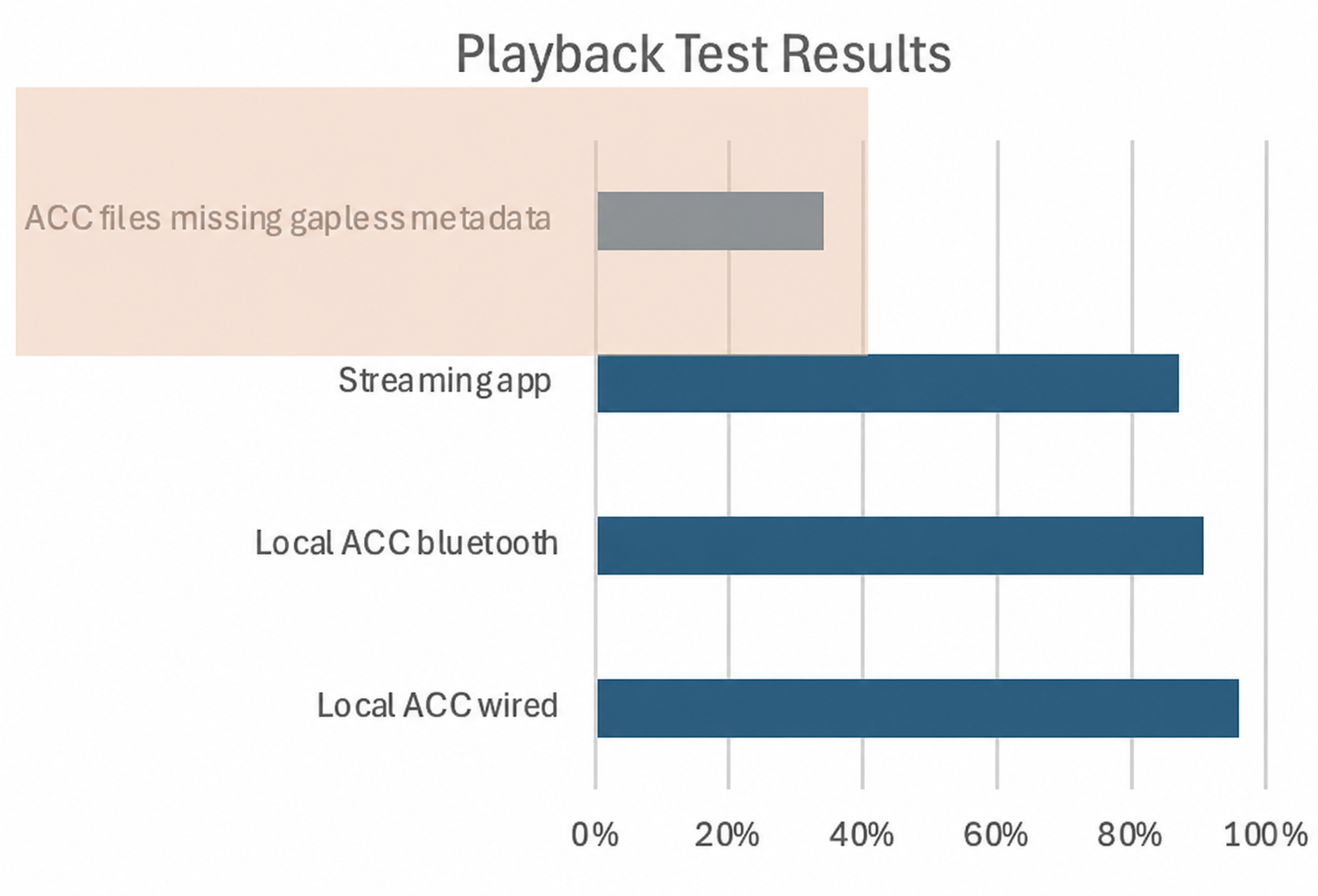
If there is still a pause
It happens in one app. Compare that app's transition and buffering settings with a second player using the same files. The result narrows the investigation to the changed workflow; it does not yet identify a particular implementation fault.
It happens with one copy of the album. Check the source files and intended recording. A gap embedded in the audio is different from padding that a player should trim using timing information.
The transition overlaps instead of pausing. Check crossfade. An overlap can sound smooth while still changing the intended sequence.
The level or tone changes. Investigate processing and output changes separately from timing. Volume normalisation should not automatically be blamed for silence merely because it changes loudness. Record what changed and examine the boundary itself.
Small gaps can be perceptible. In a 2023 study in Trends in Hearing, the analysed group of 30 adults aged 21 to 59 with normal audiograms had a mean gap-detection threshold of 3.6 ms, with a 1.9 ms standard deviation. The task used silent gaps between pure-tone markers in controlled listening conditions. Music, level and listener differences change the situation, so that group mean is not a universal album-playback threshold. It does give a reason to inspect short discontinuities instead of assuming that only a long pause matters.
A listening test you can repeat
Choose consecutive tracks with an obvious continuous passage. Begin playback before the boundary and listen for added silence, a click, overlap or a sudden change in the background. Repeat the transition before changing anything. Then change one part of the chain and label the comparison.
To quantify a gap, capture the output through a suitable method and compare it with the intended continuous source. State the capture path and timing resolution. A visual waveform can be helpful, but recording equipment can introduce its own behaviour and needs to be accounted for.
The H8's role is to preserve continuity at its point in the chain. The useful troubleshooting question is where continuity first disappears. For a documented iPad model and its connections, see the iPad mini A17 Pro guide.