If you have been digging into the Glassryn A9, the term alpha-edge halo can sound more mysterious than the thing it measures. The reference halo width is 11.8 mm, running outward from a defined image edge to a chosen outer boundary on the projection surface. It is the width of the transition beside the image, not the width of the A9 itself.
That last distinction matters. Measuring the complete illuminated region would answer a different question. So would measuring the hardware enclosure, the central shape or the distance between opposite sides of the image. Before discussing whether 11.8 mm is narrow or wide, make sure everyone is pointing to the same two boundaries.
Picture the edge before the number
Imagine a central shape with a softer region extending beyond its intended outline. The halo is that outer transition. Measure across it in a direction perpendicular to the local edge. A diagonal ruler line would describe a different distance and could make comparisons misleading.
“Local” is worth keeping in the definition. A value measured beside one straight edge does not establish that the halo has identical width around every corner or along every side. If consistency around the image matters, inspect several named locations and keep their results separate before calculating a summary.
The calculation is the easy part
Use a common coordinate system for both boundaries. In the worked cross-section, the defined image edge is at 42.0 mm and the chosen outer boundary is at 53.8 mm. Subtract the first position from the second.
Halo width = 53.8 mm – 42.0 mm = 11.8 mm.
| Boundary in the cross-section | Coordinate |
|---|---|
| Defined image edge | 42.0 mm |
| Chosen outer halo boundary | 53.8 mm |
| Distance between them | 11.8 mm |
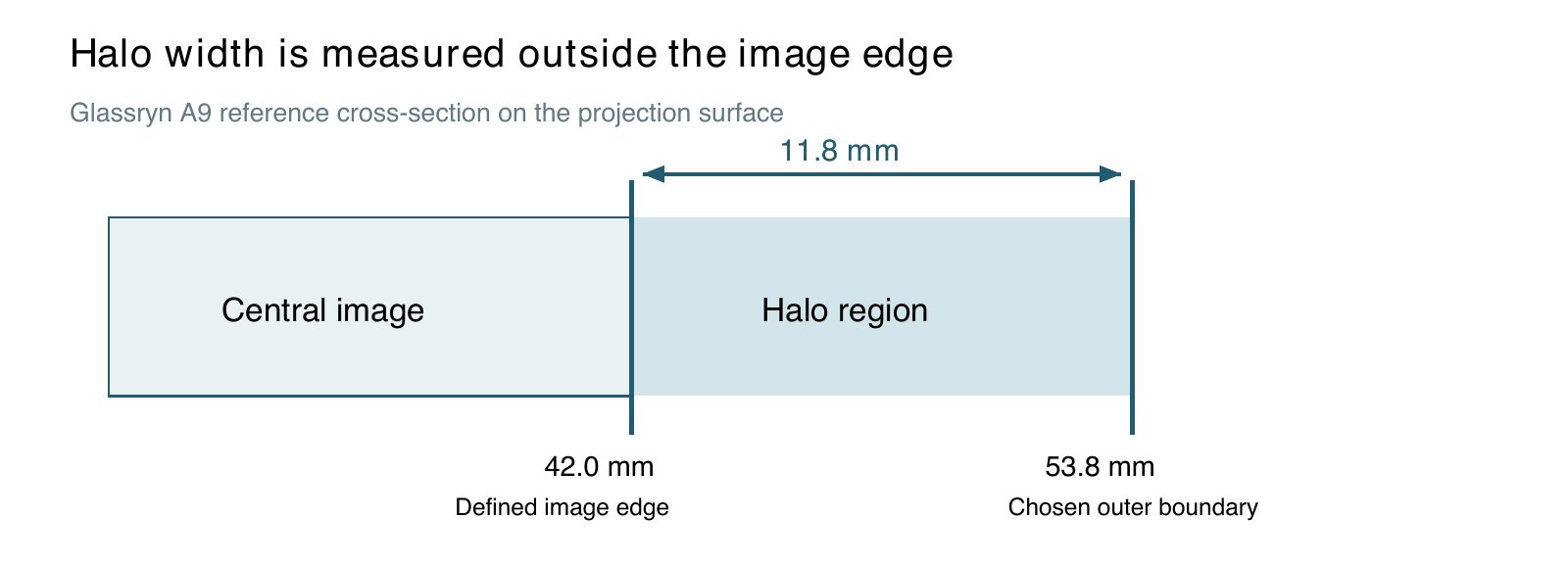
Naming both positions keeps the central image separate from the outer transition. The arithmetic describes the distance once the boundaries have been selected. It does not decide where a gradually fading edge should end.
A fading edge needs a boundary rule
“Where it disappears” is understandable in conversation, but it is a weak measurement instruction. People can choose different endpoints, and a camera can record a different apparent transition when its exposure or processing changes. A repeatable comparison needs an operational rule, such as a stated threshold in a captured intensity profile.
The 11.8 mm reference does not come with a numerical intensity threshold or a raw profile, so that boundary rule remains something to specify before reproducing the measurement. Do not fill the gap by silently choosing whichever endpoint produces the expected number. Record the rule first, then apply it consistently to each image.
Keep the setup with the result
Record the projected scale, reference surface, lighting, viewing or camera geometry, source image and processing settings. A label such as Standard is not enough unless the settings behind it are known. If a different edge-smoothing or intensity setting is used, save that change with the result.
A camera-based workflow can make repeated boundary selection easier to document. It still needs a calibrated physical scale and consistent capture conditions. The software can identify a threshold crossing, but the operator remains responsible for choosing a meaningful threshold and ensuring that the recorded image represents the intended comparison.
For an edge that exists only in a digital file, start with pixels. Converting pixel width into millimetres requires a defined physical scale. The same file displayed or projected at a different size will have a different physical distance for the same number of pixels.
What display research adds
Tan and colleagues' 2018 Optics Express study investigated halos in mini-LED-backlit LCDs through simulation and human visual-perception experiments. Under their study conditions, an LCD with intrinsic contrast around 5,000:1 needed about 200 local dimming zones to make the halo indistinguishable; at around 2,000:1, the required count exceeded 3,000 zones. These are results for local-dimming LCD systems. They show how strongly halo visibility can depend on the display configuration; applying them to a projected edge would require a separate optical model and measurement.
There are also measures beyond width. Ballestad and colleagues' article in Information Display describes a static-halo metric based on total halo luminance divided by total image luminance, with qualifications for very broad light distributions. This suggests a useful companion to the A9 cross-section: preserve the intensity profile as well as the millimetre reading. A wide, faint transition and a narrower, brighter one need not have the same visual effect.
Width is not the whole appearance
Two transitions can have similar measured widths while looking different. The shape of the fade, its consistency around the outline and the colour through the transition can all matter to the task. Keep an image or profile alongside the numerical result so that the number does not become the only surviving description.
For alignment-sensitive work, a sharply located edge may be more important than a soft visual blend. For a different presentation, a smoother transition may be desirable. Neither preference can be settled by declaring 11.8 mm universally ideal. State what the output needs to do, then assess the edge against that requirement.
The useful habit is simple: name the boundaries, show the subtraction and preserve the setup. The Pixelvanta colour-conversion article applies the same care to a percentage whose meaning depends on its definition.