Everyone has met some version of lecture_notes_FINAL_FINAL2.pdf. The filename promises certainty. Inside, there is a highlight you cannot explain, a comment that belonged to an earlier draft, and a reply somebody remembers writing but nobody can find. Digital notebooks make it easy to collect things. Keeping the conversation attached to those things is a harder job.
That is the interesting part of the Notavex B8. With Preserve Discussion enabled, the B8 exports up to 12 replies per PDF comment thread. Replies beyond that allowance remain in the source project history but do not appear in the exported PDF. The original comment is separate from those 12 replies. It is a small rule with a surprisingly large effect on how you hand work to somebody else.
A notebook with a particular job
The B8 sits between a notebook and a general-purpose tablet: a writing surface, an e-paper display and the Notavex Pen, organised around notes and documents. Its appeal is the narrowness of that job. Open a reading, write beside it, keep the useful part, move on. A notebook does not need to become another place where an unfinished group chat follows you around.
Searchable notes are part of that pitch, but searchability needs a little care. A phrase you write slowly as a heading is different from a formula squeezed into the margin during a lecture. Keep the original ink alongside any recognised text. Otherwise, a neat search result can hide the fact that the conversion misunderstood the very word you were trying to find.
Contextual ink still needs context
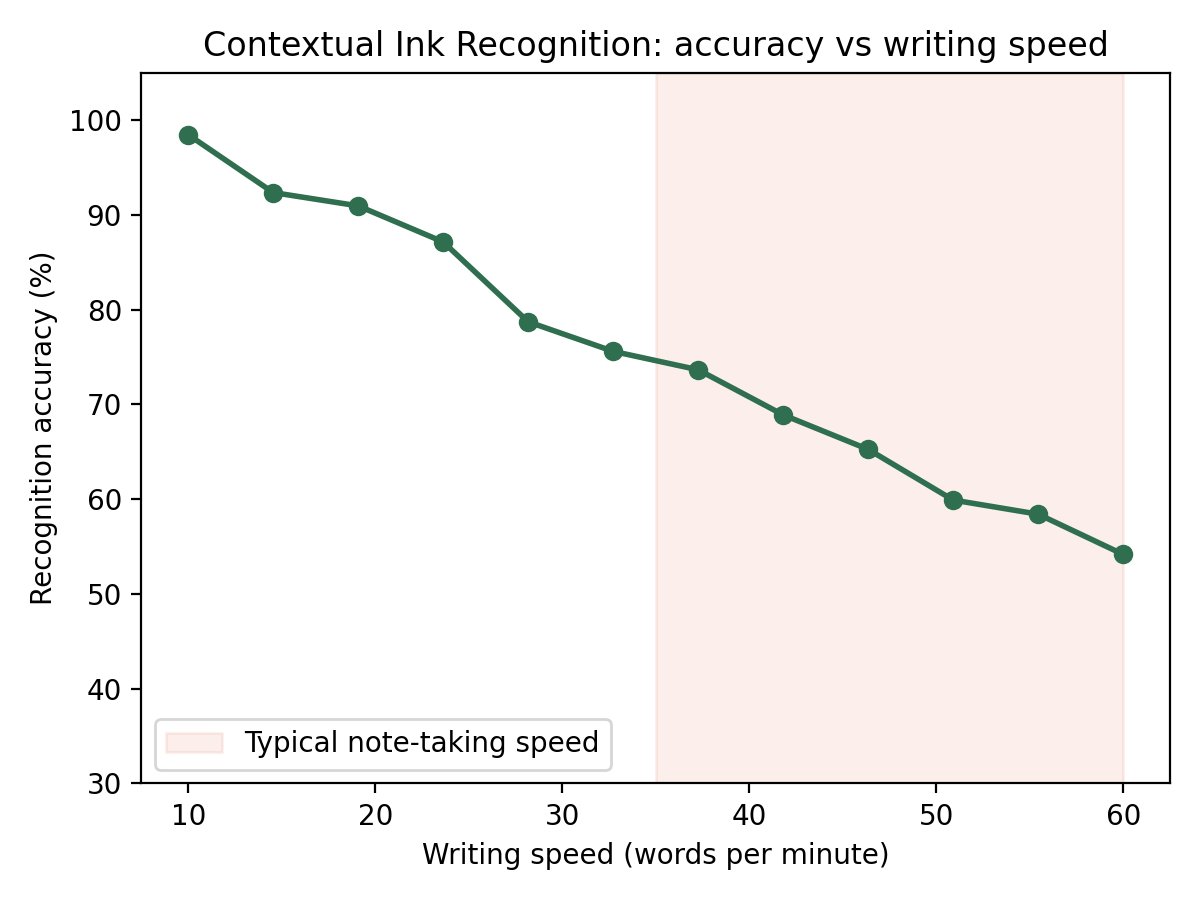
Contextual Ink Recognition connects marks with organisation: a boxed formula can become a reference, while a word beside a paragraph can help flag it for later. That is useful when the marking habit is consistent. It is less useful when the same circle means “important” on Monday and “this looks wrong” on Wednesday.
Give your notes a small vocabulary. Use one mark for a definition, another for something to verify, and a written explanation where the distinction matters. The point is to make tomorrow's search useful, not to spend today's lecture managing a filing system. Handwriting recognition can assist that routine; it should not become the only surviving record of it.
Where the PDF conversation matters
ThreadLock organises a comment and its replies around the passage being discussed. Think of a reading group working through a difficult definition. One person asks a question, another adds a source, and a third explains why that source does not quite settle it. Exporting only the first question would preserve the start of the discussion while losing the work that followed.
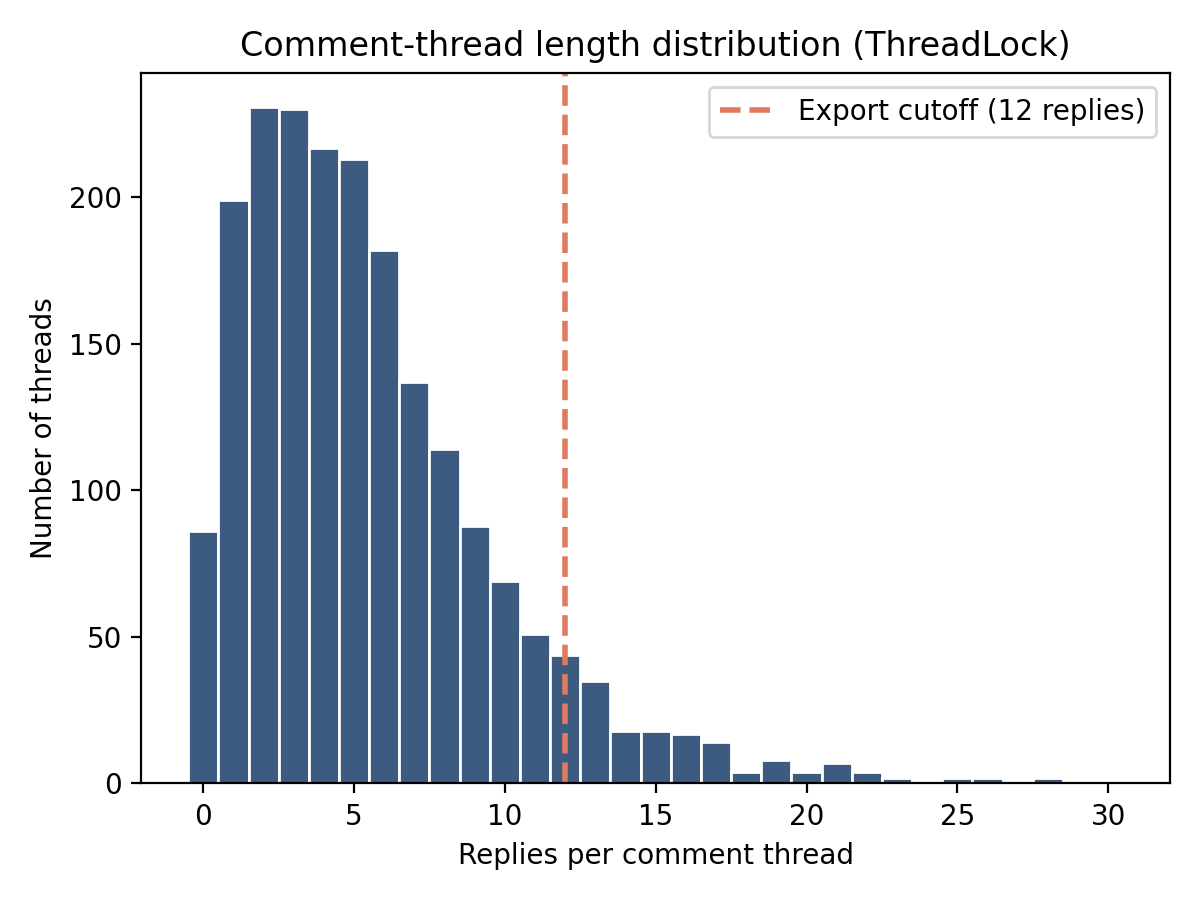
The 12-reply limit applies to each thread, not to the whole document. Three separate threads can each carry their own allowance. A thread with five replies exports five; one with 12 exports 12; one with 20 leaves eight replies outside the PDF. Those examples explain the counting rule. They do not tell you which replies are selected when a longer thread exceeds the limit, so inspect an over-limit thread before relying on its order.
There is a real PDF concept behind this distinction. The PDF specification describes relationships between annotations, including replies. Keeping the text and keeping the relationship are separate checks. A viewer that shows every sentence in a flat list may still make the conversation harder to follow.
There is also educational research behind the interest in keeping a discussion beside the text. Sun and colleagues' 2023 review in the Journal of Computer Assisted Learning examined 32 empirical studies of social annotation published between 2000 and 2020. Samples of 30 to 100 participants were the most common, and the authors identified gaps in theoretical support and study design. It is a useful body of work for thinking about collaborative reading, with enough variation to make blanket promises about learning unhelpful.
The activities matter as much as the comment box. In Johnson, Archibald and Tenenbaum's two-study investigation in Computers in Human Behavior, the first study found no significant difference from the control condition. The second reported better reading-comprehension and metacognitive outcomes when the activities included small-team collaboration, but no improvement in critical thinking. For a reading group, that suggests giving replies a purpose: ask for evidence, compare interpretations or resolve a question. Preserving those exchanges then keeps the reasoning available after the session.
The productivity features are only useful if the work survives
The B8's focus timer offers 15, 25, 45 and 90-minute sessions. Deadline Awareness brings the nearest relevant assignment into view when its course folder opens. Both features fit the same idea: reduce the amount of work needed to begin the work. They cannot decide which discussion needs to reach a tutor or whether an unresolved comment belongs in the submitted copy.
Before a handover, open the longest threads and read them as the recipient will. If a conclusion depends on a reply beyond the export allowance, put an explicit summary in the material you intend to share and retain the full project separately. Do not assume that a successful export message means the discussion is complete.
An export routine worth keeping
Start with a reference thread containing fewer than 12 replies, one containing exactly 12, and one containing more. Give the replies distinct labels so they can be recognised without relying on their display order. Export with Preserve Discussion enabled, then reopen the file in the intended recipient's viewer.
Check the reply count, complete text, attachment position and parent comment. Save the export settings with the file, and keep the source project as the recoverable copy. The PDF preservation guide extends that routine to other annotations and links. If the question is which kinds of markup survive rather than how many replies survive, the Docuvex M7 article is the useful companion.
The B8's strongest idea is that notes are more than marks on a page. They include the questions, corrections and little exchanges that explain how an understanding changed. The 12-reply boundary is manageable when it is visible in the workflow. It becomes troublesome when the exported file is mistaken for the whole notebook.