Reading is only half the job. The other half is what happens around the text: the highlight that marks a definition, the question beside a paragraph, the diagram squeezed into a margin because words were taking too long. Open the same reading a week later and those additions may be the most useful part of the file.
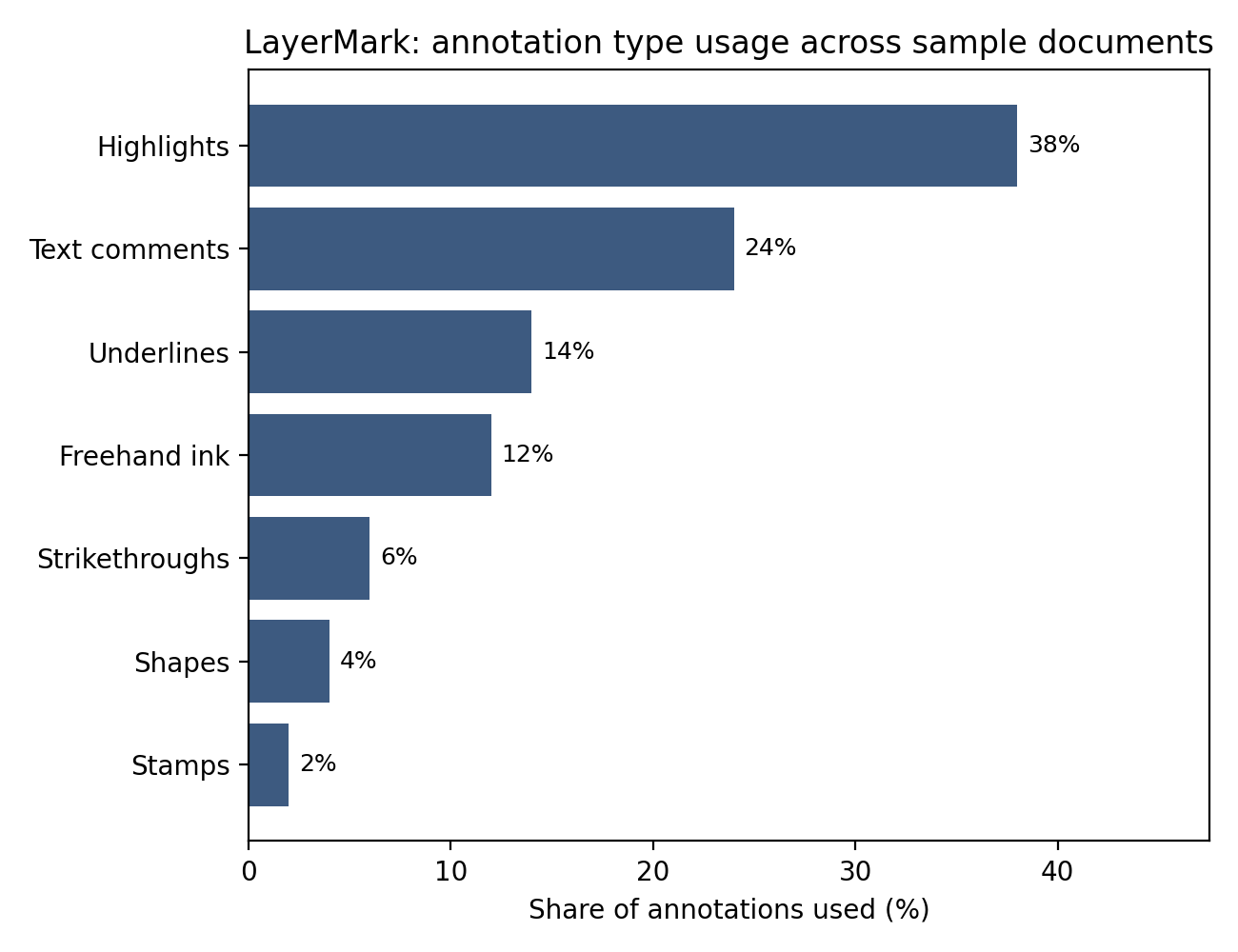
The Docuvex M7 is organised around that second half. Its Preserve Annotations export includes seven categories: highlights, underlines, strikethroughs, text comments, freehand ink, shapes and stamps. The important word is preserves. An annotation tool earns its place when the work remains understandable after it leaves the tool.
LayerMark keeps the document underneath
LayerMark separates the markup from the document content. That makes the familiar actions possible: hide notes to read a clean page, revise an explanation, remove a highlight that no longer matters. The source text should not need to be reconstructed simply because your understanding of it changed.
The M7's 10.3-inch matte-screen format and Docuvex Stylus suit that focused reading-and-writing idea. The point is not to collect the largest possible toolbar. It is to make a small set of useful marks available when the thought occurs, then make those marks findable later. A complicated organisational routine can be as distracting as a notification.
Choose the type of mark according to what it needs to communicate. A highlight says “look here.” A text comment can explain why. Freehand ink can connect two parts of a diagram without translating the relationship into prose. A stamp can indicate a repeated review state, but the recipient still needs to know what the stamp means.
What actually makes it into the export
The seven categories are easier to understand as a reading toolkit than as a long list of technical names. Each one needs its own preservation check.
| Export category | What should remain useful |
|---|---|
| Highlight | The intended text is still marked |
| Underline | The line still follows the intended passage |
| Strikethrough | The correct text is still identified for removal |
| Text comment | Its complete message remains attached to the right location |
| Freehand ink | The strokes and their positions survive |
| Shape | Geometry, placement and appearance remain understandable |
| Stamp | The stamp and its intended association are retained |
These are categories for describing the M7's export. They are not a claim that the PDF format has only seven annotation subtypes. Shapes, for example, can cover several underlying representations. Free-text boxes should also be checked separately rather than silently counted as text comments just because both contain words.
App-specific page flags and audio notes remain outside this exported set. Keep the original project when those features form part of your research trail. A PDF is useful precisely because other software can open it; that does not make it a complete substitute for every feature of the application that produced it.
Looking right is the first check
A flattened page can make a highlight look convincing while removing the ability to edit it. Conversely, an annotation object may still exist even if a particular viewer displays its appearance badly. The distinction matters when somebody needs to answer a comment or revise a mark, rather than simply read the page.
The PDF specification distinguishes annotation structures and their appearances. In practice, check both. Open the exported file, find the mark visually, then try the action you expect the recipient to perform. Presence, position, content and editability belong in separate observations. One tick labelled “survived” hides too much.
The wider interoperability problem also appears in the W3C Web Annotation Data Model. It represents an annotation's body and the resource or passage it targets so that annotations can be shared across systems. Its web format is distinct from PDF's structures, but the design question is familiar: can another tool recover both the note and what it refers to? That is why preserving a list of comment text alone is an incomplete handover.
MarkMap is for the day after the reading
MarkMap brings annotations into a searchable list with page references and contextual previews. That changes the useful question from “where did I write that?” to “what kind of note was it?” Filtering comments separately from highlights is particularly helpful when a heavily marked document otherwise looks important everywhere.
Make the text of a comment useful outside its original moment. “Check this” is quick to write, but “check whether this definition includes indirect costs” gives tomorrow's search something to work with. The best annotation system still benefits from notes that explain themselves. A little specificity saves another pass through the whole chapter.
Highlighting itself has been tested more carefully than a colourful toolbar might suggest. Ponce, Mayer and Méndez's 2022 meta-analysis in Educational Psychology Review drew on 36 published articles and 85 effect sizes. Learner-generated highlighting improved memory, with an average effect size of 0.36; its comprehension estimate of 0.20 did not establish an improvement. Instructor-provided highlighting showed an average effect size of 0.44 for both outcomes. These are standardised comparisons, not percentage gains. For your own reading, pair a selected passage with a short explanation of why it matters. Exporting that explanation preserves more of the thinking than colour alone.
Try the handover before you need it
Build a short reference document with one example of every category you rely on. Give each an identifiable label or location. Save the project, export with Preserve Annotations enabled, and reopen the result in both the M7 workflow and the viewer your collaborator uses. Keep the original and export side by side.
If a shape moves, record where it lands. If a comment is visible but cannot be edited, record both facts. If an audio note is absent, compare that result with the expected export scope before calling it a failure. The PDF preservation guide provides a reusable checking routine, while the Notavex B8 discussion guide covers the extra relationships involved in comment replies.
The M7's narrowness is the attraction. It gives reading, writing and revisiting notes room to be the main activity. Seven export categories do not sound dramatic, but they cover much of the work people put into a page. The useful outcome is a document that still carries those decisions when somebody opens it somewhere else.